 Start Earning
See Glasses on Their Face
Give shoppers a more personal way to preview selected eyeglasses and sunglasses before placing an order.


Turn your WooCommerce store into an interactive eyewear shopping experience. Let shoppers preview glasses on their own face using a phone’s front camera or a computer webcam — without AI APIs, a separate app, or a complicated setup.
Product photos show the frame. A virtual try-on experience helps customers imagine how it may look on their own face — right on the product page, at the moment they are deciding whether to buy.
Give shoppers a more personal way to preview selected eyeglasses and sunglasses before placing an order.
Help customers move beyond product photos and make a more informed choice with an interactive preview.
Let customers start with a compatible mobile front camera or desktop webcam, without downloading a separate app.
Add a practical glasses try-on feature to your existing WordPress and WooCommerce store. The plugin uses browser-based face detection and locally bundled JavaScript/model files by default, so the core try-on experience does not require a paid AI API.
Use the plugin’s local assets by default instead of relying on a third-party AI endpoint.
Open the try-on interface from your WooCommerce product experience rather than sending shoppers to another app.
Control button display, button styling, optional calibration, and guidance settings from the plugin’s available settings.
Try the demo below on a product where the plugin’s glasses image has been configured. Allow camera access when your browser asks.
Tip: Use good lighting, face the camera directly, and use a plain background for best detection results. Camera access generally requires HTTPS.
A focused virtual eyewear preview that fits into the WooCommerce product journey.
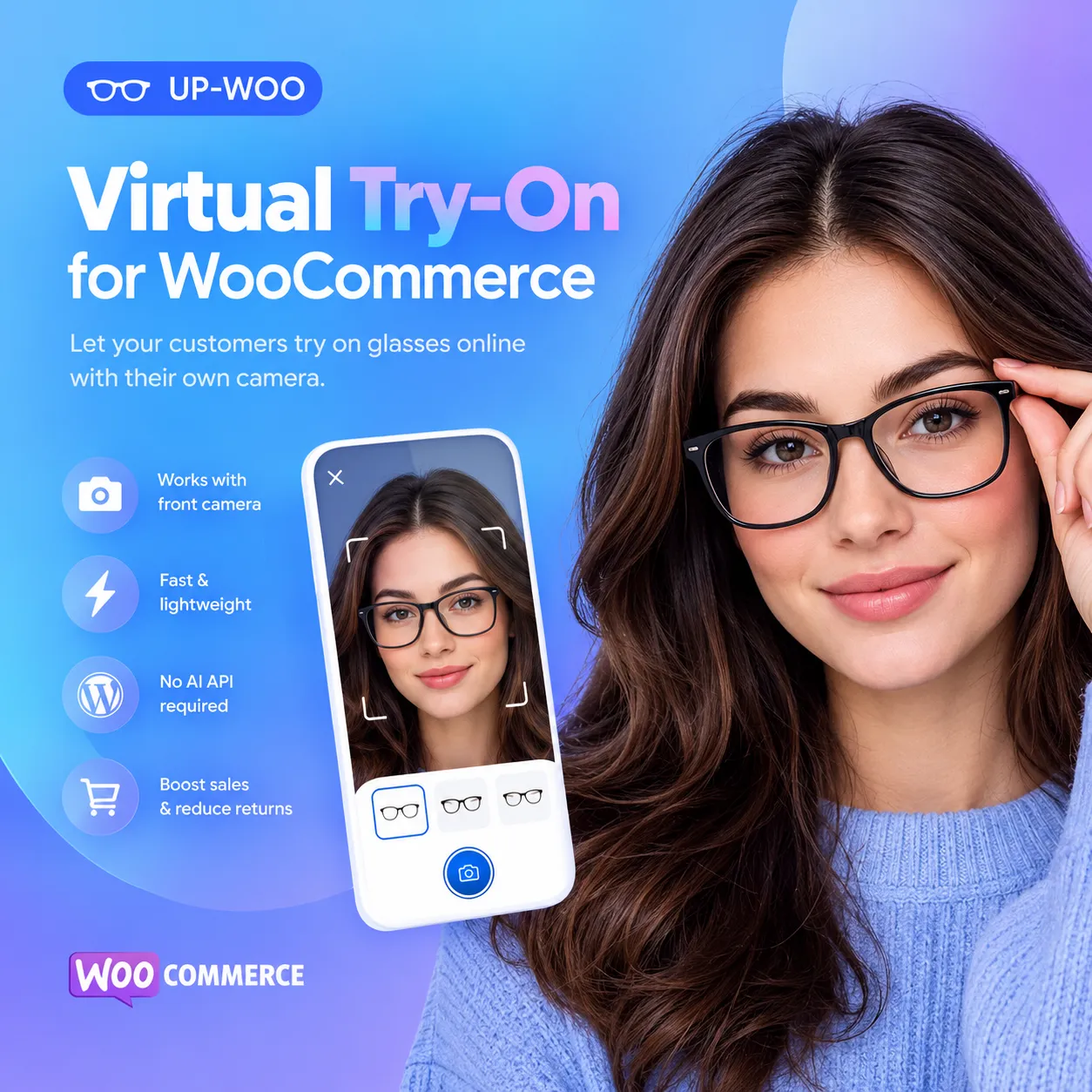
Let shoppers use a compatible phone camera or webcam to preview glasses on their face in the browser.
The default setup uses bundled JavaScript and face-detection model files rather than requiring an AI API call.
Enable the bank-card calibration workflow and enter real frame measurements to help tune the on-screen fit.
Give shoppers controls to adjust preview size and position, reset the view, and access guidance.
Use the screenshot control in the try-on interface to capture the current preview when available.
Choose automatic button display on product pages or place the try-on trigger with the shortcode.
Keep the experience simple, from product discovery to purchase.
The customer visits a WooCommerce product page where virtual try-on has been enabled and a glasses image configured.
They tap the try-on button, allow camera permission, and position their face in suitable lighting.
They view the frame, use the available size or position controls, and return to the product to make a purchase decision.
Eyewear is personal. When shoppers cannot try frames in person, uncertainty can slow down a purchase. An on-page virtual preview can help bridge that gap and make product discovery more engaging.
Results vary by store, traffic quality, product imagery, fit accuracy, and customer experience. No specific conversion increase or return reduction is guaranteed.
Explore the product price, customer rating, purchase option, and available trial directly below. The purchase and trial shortcodes are intentionally placed side by side.
Bring browser-based glasses previews to your eyewear product pages with a configurable try-on button and optional frame-size calibration.
Original price was: 80 $.45 $Current price is: 45 $.
Share this product and earn 5 $ per sale!
Start EarningTrial eligibility, discount messages, and referral behavior depend on the corresponding plugins and their settings.
No AI API is required for the default setup. The plugin includes local JavaScript and face-detection model assets. The settings also include an optional CDN source, so keep the local source selected if your priority is avoiding external script hosting.
Yes, customers can use a compatible mobile browser with a front-facing camera. Camera permission is required, and camera access typically needs a secure HTTPS page.
The plugin supports automatic display on eligible product pages and a shortcode option. You can use where shortcode rendering is supported by your WordPress page content or builder.
Yes. Product settings support an uploaded PNG glasses image and optional frame width, height, lens width, bridge width, and age group. These values can help tune the preview, but the result still depends on the source image, camera position, and calibration.
No tool can guarantee a particular business result. Virtual try-on can help reduce uncertainty and improve the shopping experience, while actual conversion and return outcomes depend on your products, traffic, pricing, and implementation.
Use a well-lit space, face the camera directly, keep your face clearly visible, and choose a simple background. If optional calibration is enabled, follow the on-screen bank-card positioning instructions.
Add a practical virtual glasses try-on experience to your WooCommerce store and give customers another reason to explore your eyewear collection with confidence.
Read the product details and comments before choosing the right option for your store.
Online eyewear shoppers face one persistent question before every purchase: “Will these glasses suit me?” Product photos show the frame, but they cannot show how that frame will look on a customer’s own face. This uncertainty slows down purchase decisions, increases hesitation, and leads to higher return rates for eyewear stores.
Virtual Try-On for WooCommerce solves this problem directly. It adds a practical Virtual Glasses Try-On experience to your existing WordPress and WooCommerce store, letting shoppers preview eyeglasses and sunglasses on their own face using a phone’s front camera or a desktop webcam — right on the product page, at the exact moment they are deciding whether to buy.
No app downloads. No AI API subscriptions. No complicated setup. Just a browser-based virtual try-on that works inside your store.
This WordPress Virtual Try-On Plugin is built specifically for eyewear stores running on WooCommerce. It overlays selected frames onto a live camera feed using browser-based face detection and locally bundled JavaScript and model files. The core try-on experience runs entirely in the shopper’s browser — no paid AI endpoint, no third-party service account, and no external API keys required.
In short, it is a Virtual Eyewear Try-On solution designed to fit naturally into the WooCommerce product journey without adding technical overhead or ongoing subscription costs.
Shoppers can use a compatible mobile front camera or desktop webcam to preview glasses on their face directly in the browser. The plugin supports both Glasses Try-On with Webcam on computers and Virtual Try-On on mobile devices, giving every customer a consistent experience regardless of how they shop.
The default setup uses bundled JavaScript and face-detection model files rather than relying on a third-party AI endpoint. This means the Virtual Try-On Without AI overhead is entirely possible for the core experience. You do not need to pay for AI API credits, manage external service accounts, or worry about per-request costs scaling with your traffic.
The try-on interface opens from within your WooCommerce product experience rather than redirecting shoppers to a separate app or external website. This keeps customers engaged with your brand and your product page throughout the entire try-on process, reducing the risk of losing them to a distracting external journey.
For stores that want a more precise fit, the plugin includes an optional bank-card calibration workflow. By entering real frame measurements, you can help tune the on-screen fit so customers get a more accurate sense of how the glasses will sit on their face.
Shoppers are not locked into a single view. They can adjust preview size and position, reset the view, and access guidance directly within the try-on interface. When available, the interface also includes a screenshot control so customers can capture their current preview — a feature that encourages social sharing and personal comparison.
You can choose to display the try-on button automatically on product pages, or place the trigger manually using a shortcode. This flexibility lets you control exactly where and how the try-on experience appears across your store, whether you want it on every eyewear product or only selected items.
The shopper journey is intentionally simple, designed to reduce friction rather than add it.
Step 1 — Open a Glasses Product: The customer visits a WooCommerce product page where virtual try-on has been enabled and a glasses image has been configured.
Step 2 — Allow Camera Access: They tap the try-on button, grant camera permission in their browser, and position their face in suitable lighting. Camera access generally requires your store to be served over HTTPS.
Step 3 — Preview, Adjust, Then Shop: They view the frame on their face, use the available size or position controls to fine-tune the preview, and then return to the product page to make a purchase decision — all without leaving your store.
Eyewear is a personal purchase. When shoppers cannot try frames in person, uncertainty can slow down a purchase or push them toward abandoning the cart entirely. An on-page Online Sunglasses Try-On experience helps bridge that gap by giving customers a more personal way to preview selected eyeglasses and sunglasses before placing an order.
The benefits extend beyond the individual shopper:
Reduce purchase doubt: Customers move beyond static product photos and make a more informed choice with an interactive preview.
Increase engagement: An interactive try-on experience gives shoppers a reason to spend more time on your product pages.
Support mobile shopping: With front-camera support designed for mobile devices, you meet customers wherever they are shopping from.
Lower return friction: When customers have a clearer sense of how a frame may look on their face, they are better equipped to choose confidently.
This WooCommerce Glasses Plugin is not a generic solution adapted from another platform. It is designed for WordPress and WooCommerce stores that sell eyewear. It integrates with your existing product pages, uses your WooCommerce product setup, and fits into the workflow you already have.
Whether you run a dedicated online eyewear store, an optical shop with an e-commerce presence, or a boutique sunglass retailer, this plugin adds a practical virtual try-on layer without requiring you to rebuild your store or change your platform.
Many virtual try-on solutions require a monthly AI service subscription, an external account, or a separate app that shoppers must download. This plugin takes a different approach. The core try-on experience is powered by browser-based processing and locally bundled assets, so you can offer Virtual Try-On for Eyewear Stores without the recurring costs and integration complexity that come with AI-dependent alternatives.
You install it on your WordPress site, configure the glasses image for your products, and let shoppers try frames on from their browser. That is the core workflow — practical, direct, and built for real eyewear stores.
If you want to add a Virtual Glasses Try-On experience to your WooCommerce store without the overhead of AI API subscriptions or external app dependencies, Virtual Try-On for WooCommerce is built for exactly that purpose.
Give your eyewear shoppers a more personal, more confident way to preview frames before they buy.
You must be logged in to post a review.










Reviews
There are no reviews yet.