 Start Earning
01
Wallet payments at the counter
Let logged-in customers use their available WooCommerce wallet balance when placing an in-store order through OpenPOS.


Give customers a simple way to spend their WooCommerce wallet balance at your physical checkout. OpenPOS remains your POS — this integration adds the wallet payment experience you need.
This is a companion extension — not a replacement for OpenPOS. Keep your existing POS workflow and add wallet-powered payments for customers who already have WooCommerce credit.
Let logged-in customers use their available WooCommerce wallet balance when placing an in-store order through OpenPOS.
The wallet amount used for a successful OpenPOS purchase is handled automatically as part of the payment flow.
When the wallet does not cover the full order, use the available credit and continue with the remaining amount.
Show the customer the wallet balance, amount used and remaining amount during the wallet payment experience.
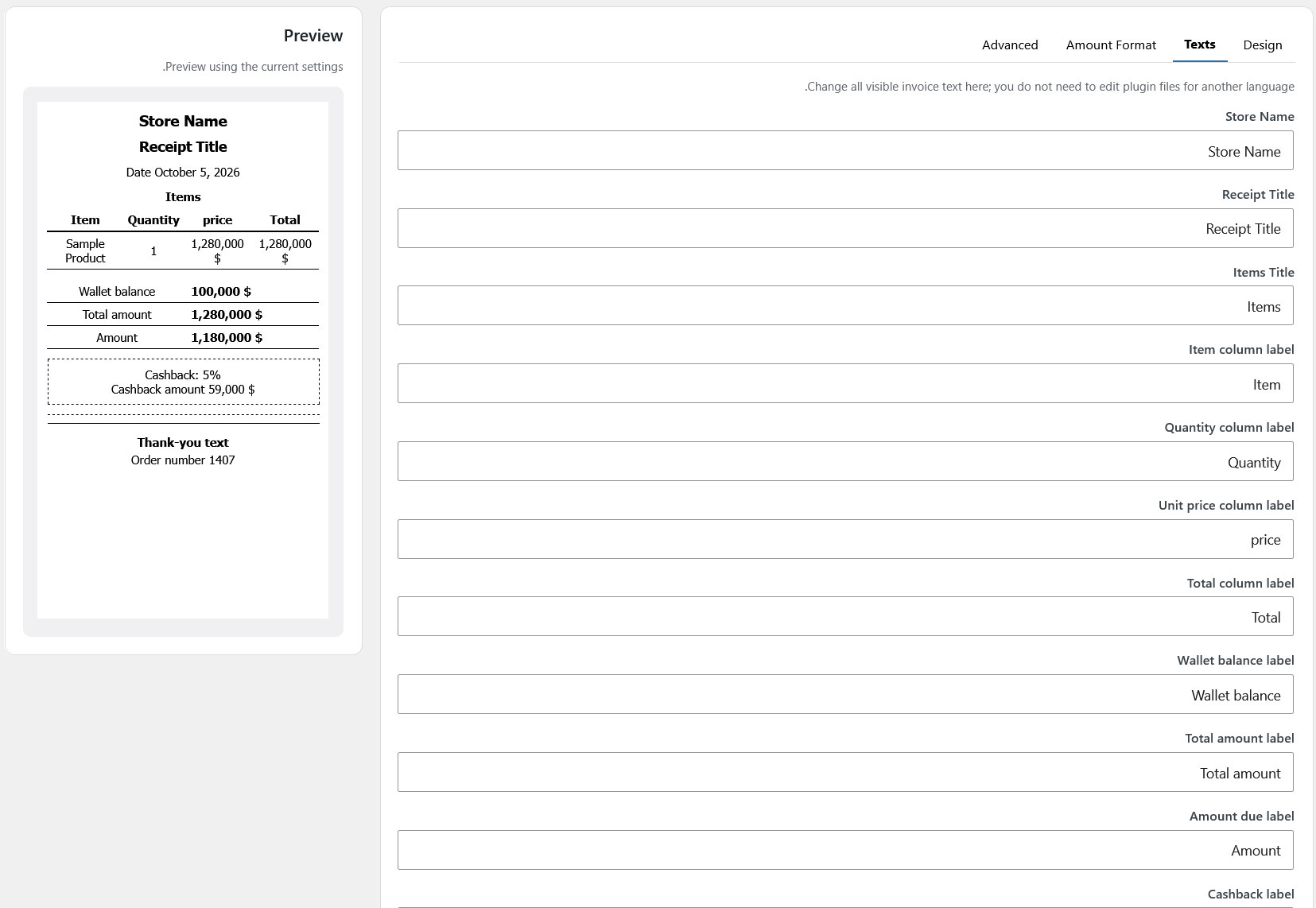
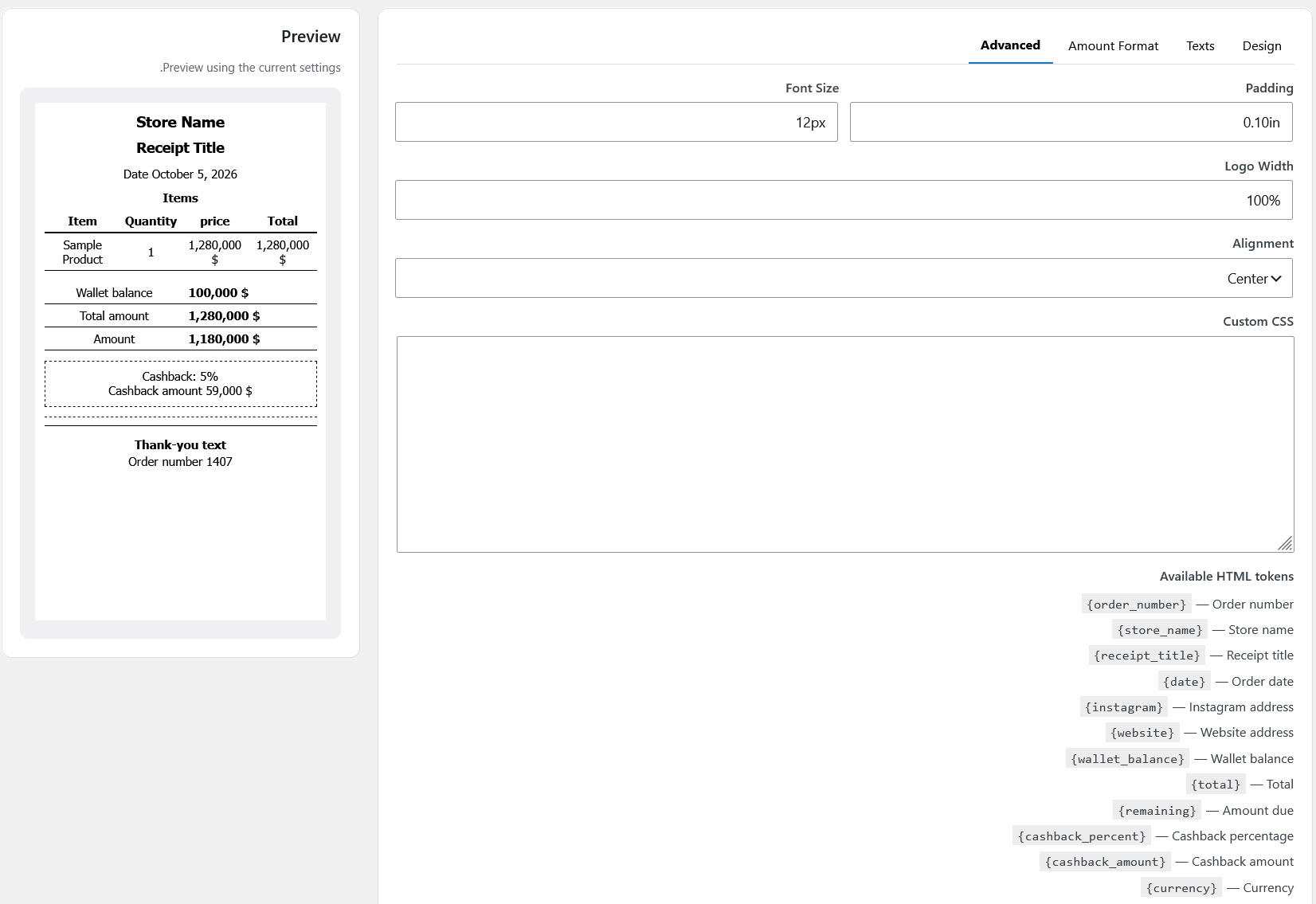
Create a separate, professional receipt and invoice design for OpenPOS wallet purchases and customize its content.
When products from an eligible in-store purchase are returned, the wallet-paid amount can be returned to the customer's wallet.
Customize invoice labels and content so your printed document matches your store's language and branding.
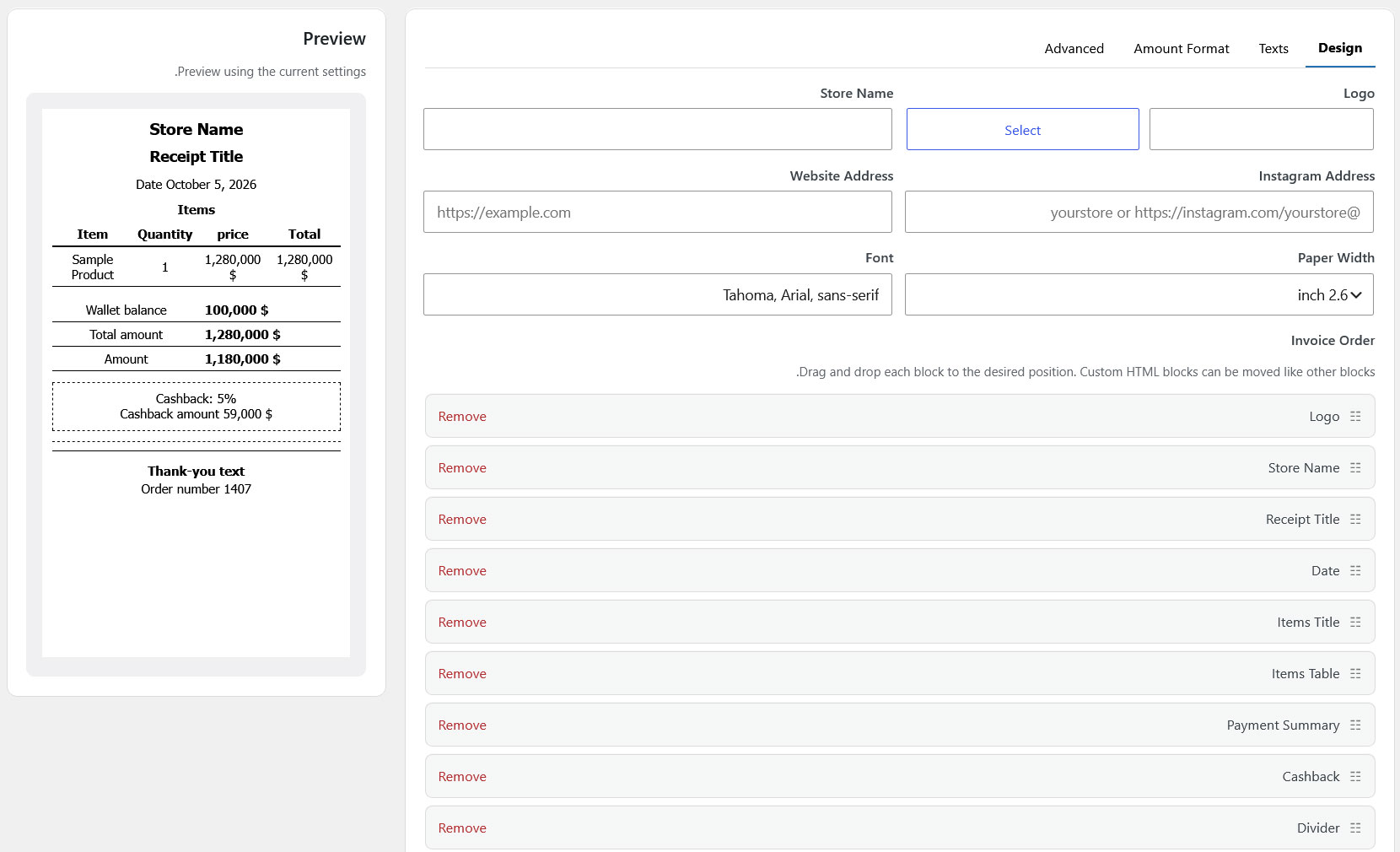
Build a dedicated OpenPOS invoice layout with configurable blocks, amount formatting and optional wallet information.
Customers can already have credit in their WooCommerce wallet. This integration brings that same balance into the OpenPOS experience, helping you create a more consistent wallet journey across online and in-store purchases.
Show your customers exactly how their wallet credit was used. The invoice can be designed separately for your OpenPOS workflow and its text can be customized.
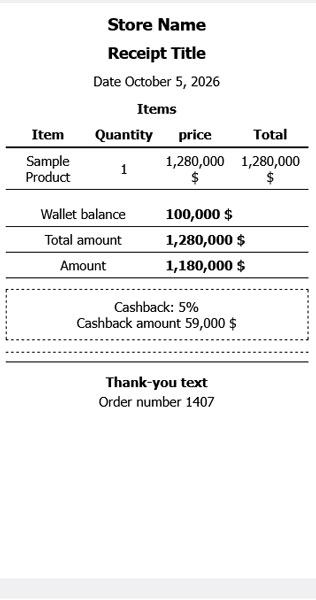
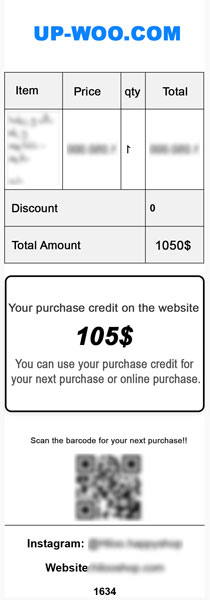
Explore the settings and Invoice Builder from your WordPress dashboard. Swipe through the screenshots to see how much control you have over the wallet and invoice experience.
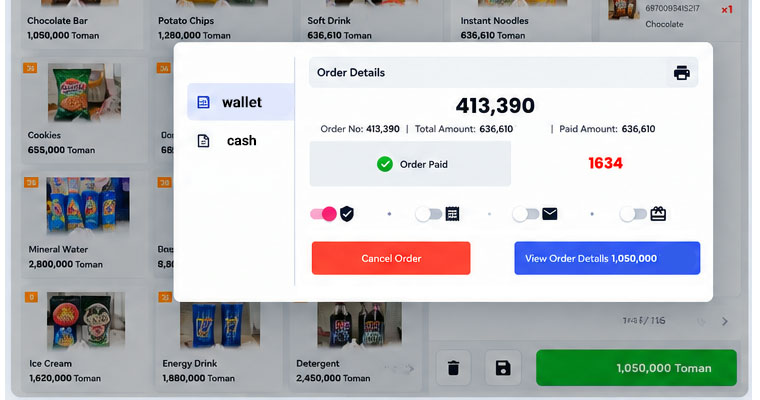
The customer's WooCommerce wallet balance is available to use.
The wallet payment option is selected inside your OpenPOS checkout.
The available wallet amount is applied and the remaining amount is calculated.
After successful payment, your configured OpenPOS invoice can be printed.
Install the full version and evaluate the wallet payment workflow in your store before deciding to continue.
Original price was: 60 $.39 $Current price is: 39 $.
Share this product and earn 4 $ per sale!
Start EarningOur wallet plugin seamlessly connects the Wallet to the POS plugin, allowing customers to use their wallet balance both online and in-store.
After a purchase, store credit is automatically added to the user's wallet. For example, 10% of the purchase amount is allocated as credit.
Your store credit can be used in two ways: online (when placing an order on the website) and in-store (when paying at the POS). You have a single balance that works in both environments.
Yes, the store credit is printed on the invoice. Your invoice includes a section called "Your Store Credit" that displays the credit amount.
If the user returns an order, both the allocated credit and its amount are automatically deducted. This process is handled automatically by the system.
Yes, to use the credit, simply place your order using the mobile number registered on the site. You can use your store credit for your next purchase or online purchase.
Based on available information, TeraWallet is only available in online mode. This feature is not active in offline mode.
Yes, the system displays the customer's wallet balance during payment and prevents the transaction if there is insufficient balance.
Yes, during checkout at POS, the amount is automatically deducted from the customer's wallet.
Yes, OpenPOS supports multi-payment (split payment). This means the customer can pay part of the amount with their wallet and the rest with a card or cash.
A focused companion plugin for WooCommerce stores that want wallet credit to work naturally at the physical checkout.
Bring your WooCommerce wallet to the counter. Accept wallet payments in OpenPOS. Deduct balances automatically. Print wallet-ready invoices. Refund to wallet.
If you run a WooCommerce store with OpenPOS as your point-of-sale system, you already know the frustration: customers have wallet credit online, but they cannot spend it in your physical store. They carry a balance on your website, yet at the counter they have to pay with cash or card—two separate payment experiences for the same customer.
OpenPOS Wallet is a lightweight companion add-on that solves this problem. It connects the TeraWallet (or Woo Wallet) customer balance with the OpenPOS checkout, so your customers can pay with their wallet credit both online and in-store. No friction. No manual workarounds. No duplicate payment systems.
This is not a replacement for OpenPOS. It is a focused integration designed specifically for stores that already use OpenPOS and want to extend it with wallet-powered payments.
This plugin is built for:
WooCommerce store owners who already use OpenPOS – WooCommerce Point of Sale (POS).
Retail businesses that offer customer wallet credit online and want to accept that credit at the physical counter.
Multi-channel sellers who want one balance that works in the online shop and at the POS terminal.
Store managers who need wallet balances, used amounts, and remaining amounts displayed clearly during checkout.
If your customers already hold wallet credit in WooCommerce, this add-on lets them spend it in your store.
Logged-in customers can select Wallet as a payment method directly inside the OpenPOS checkout screen. The available wallet balance is retrieved from TeraWallet or Woo Wallet, displayed to the cashier and customer, and applied to the order.
No extra steps. No switching between systems. The wallet becomes a native payment option alongside cash, card, and split payments.
When a wallet payment is confirmed in OpenPOS, the used amount is automatically deducted from the customer’s wallet balance. The transaction is recorded in the wallet ledger, so the customer’s online balance and in-store balance stay perfectly in sync.
Not every customer has enough wallet credit to cover the full order. OpenPOS Wallet supports partial wallet payment: the available wallet balance is applied first, and the remaining amount is completed with cash, card, or any other OpenPOS payment method.
This gives your customers flexibility and prevents abandoned sales due to low wallet balances.
The integration displays the customer’s wallet balance, amount used, and remaining amount to pay directly in the OpenPOS checkout flow. Cashiers can see exactly how much credit is available and how much still needs to be collected.
Every wallet-powered purchase can generate a dedicated OpenPOS invoice that clearly shows:
The wallet balance before the purchase
The amount deducted from the wallet
The remaining amount paid via other methods
The updated wallet balance (optional)
You can customize invoice labels, amount formatting, and optional wallet blocks using the built-in Invoice Builder, so your printed receipt matches your store’s branding and language.
When an eligible in-store order is returned, the amount originally paid from the wallet can be credited back to the customer’s wallet. This keeps refunds inside your ecosystem and encourages customers to return and spend again.
The refund flow respects OpenPOS’s existing return and refund workflow while ensuring the wallet balance is correctly updated.
The integration verifies that the customer has sufficient wallet balance before processing a wallet payment. If the balance is too low for the requested amount, the system either applies a partial payment or prevents the wallet payment entirely, depending on your configuration.
This prevents negative balances and keeps your accounting accurate.
OpenPOS Wallet connects directly with TeraWallet, the most widely used customer wallet plugin for WooCommerce. It reads wallet balances, records deductions, processes refunds, and respects TeraWallet’s transaction logging system.
If you use Woo Wallet instead, the integration supports that as well.
| Benefit | What It Means for Your Store |
|---|---|
| One balance, two channels | Customers spend the same wallet credit online and in-store. |
| Faster counter checkout | Wallet payment is quicker than card—ideal for queues. |
| Higher customer retention | Wallet credit keeps customers returning to your store. |
| Refunds that stay in your business | Wallet refunds encourage repeat purchases instead of cash-out. |
| No OpenPOS replacement | Your existing POS workflow remains intact. |
| Professional invoicing | Print wallet-aware receipts that build trust. |
Customer logs in at the OpenPOS checkout. Their WooCommerce wallet balance is retrieved automatically.
Cashier selects Wallet as the payment method. The available balance is displayed.
Wallet credit is applied to the order. If the balance is insufficient, the remaining amount is collected via another payment method.
Payment is completed. The wallet balance is deducted, the transaction is logged, and the OpenPOS invoice is generated.
If the order is returned, the wallet-paid amount is credited back to the customer’s wallet.
Is this a replacement for OpenPOS?
No. OpenPOS Wallet is a companion add-on. It requires OpenPOS to be installed and active. It does not modify or replace any core OpenPOS functionality.
Which wallet plugins are supported?
TeraWallet (WooCommerce Wallet) and Woo Wallet are both supported. The integration reads balances, deducts payments, and processes refunds through the native wallet APIs.
Can customers use partial wallet payment?
Yes. If the wallet balance is lower than the order total, the available credit is applied and the remaining amount is paid using any other OpenPOS payment method.
Does the wallet balance update automatically after payment?
Yes. The used amount is deducted automatically and recorded in the wallet transaction log.
Can I refund to the wallet instead of cash or card?
Yes. When an eligible in-store order is returned, the wallet-paid amount can be returned to the customer’s wallet.
Does it work in offline mode?
Wallet payments require an online connection to verify balances and process deductions. OpenPOS’s offline mode handles other payment methods, but wallet payments are processed when the connection is available.
Can I customize the invoice?
Yes. The Invoice Builder lets you configure wallet-related blocks, labels, and amount formatting. You can create a dedicated invoice design for wallet-powered purchases.
Is wallet balance checked before payment?
Yes. The system verifies sufficient funds and prevents wallet payments that would overdraw the balance.
Can wallet and card be combined in a single checkout?
Yes. OpenPOS supports split payments, and the wallet can be one part of a combined payment.
Will this work with my existing OpenPOS settings?
Yes. The add-on integrates with OpenPOS’s existing checkout, payment, and invoice systems without overriding your configured settings.
WordPress 5.0 or higher
WooCommerce 4.0 or higher
OpenPOS – WooCommerce Point of Sale (POS) (active license)
TeraWallet or Woo Wallet (active)
PHP 7.4 or higher
Fully functional OpenPOS Wallet integration plugin
Wallet payment option in OpenPOS checkout
Automatic balance deduction and transaction logging
Partial wallet payment support
Wallet-aware invoice builder with customizable blocks
Wallet refund support for returns
Balance visibility during checkout
Documentation and setup guide
7-day free trial available
Your customers already have wallet credit. Let them spend it in your store.
Install OpenPOS Wallet, connect TeraWallet or Woo Wallet, and bring the online wallet experience to your physical checkout—without replacing OpenPOS.
Start your 7-day free trial today.
You must be logged in to post a review.














Reviews
There are no reviews yet.